
.png)
Want to audio record life stories and preserve them for decades? Here's how:
- Use reliable formats: Save recordings in lossless formats like WAV or FLAC to maintain quality and ensure compatibility with future technology.
- Back up your files: Follow the 3-2-1 rule - keep three copies, use two different storage types, and store one copy off-site.
- Plan for migrations: Update storage devices and file formats every 10–20 years to avoid obsolescence.
- Run regular checks: Use tools like SHA-256 checksums to ensure files remain intact and uncorrupted.
- Organize your files: Add metadata and transcripts to make recordings easy to find and accessible even if audio playback technology changes. This is especially important when you record stories with generational context for your family.
Choose File Formats That Last
The file format you pick today plays a huge role in whether your recordings will still be accessible decades down the line. Some formats fall out of favor as technology evolves, while others stand the test of time, remaining usable across generations.
For long-term preservation, uncompressed and lossless formats are your best options. WAV (Waveform Audio File Format) has been a go-to in the industry for years because it delivers flawless audio quality and works seamlessly with nearly all professional software.
If you’re looking for a more storage-friendly alternative without giving up quality, FLAC (Free Lossless Audio Codec) is a solid choice. It reproduces audio with exact precision but takes up about half the space of WAV files, thanks to its efficient compression (40% to 60% smaller). Plus, since FLAC is open-source and non-proprietary, it’s more likely to stay accessible as technology changes.
Here’s a closer look at the best formats and why certain others should be avoided.
Best File Formats for Long-Term Storage
When archiving important recordings, stick with formats that are open-source, widely supported, and either uncompressed or losslessly compressed. WAV and its professional sibling, BWF (Broadcast Wave Format), are excellent choices. They offer perfect sound quality and compatibility across platforms. BWF also lets you embed metadata - like recording dates, locations, or speaker names - directly into the file. For reference, a CD-quality WAV file uses about 10MB of storage per minute.
FLAC provides an outstanding balance between storage efficiency and quality, preserving audio perfectly while cutting file sizes significantly. Meanwhile, AIFF (Audio Interchange File Format), Apple’s uncompressed format, serves as the macOS counterpart to WAV. Choosing any of these formats helps ensure your recordings remain accessible for years to come.
Why to Avoid Lossy Formats for Archives
While lossless formats are ideal for preservation, it’s equally important to understand why lossy formats aren’t suitable for archiving. Formats like MP3 and AAC reduce file sizes by permanently removing audio data. For example, a CD-quality audio stream has a bitrate of 1,411 kbps, but a 128 kbps MP3 retains only about 10% of that original data. Once that data is gone, it’s gone for good.
"You can take away data, but you can't put it back!" - Recollection Wisconsin
Even if you convert a lossy file back into a lossless format like WAV, the lost data won’t magically reappear - it just creates a larger file with no quality improvement. Worse still, converting between lossy formats (like MP3 to AAC) can lead to cumulative quality loss, degrading the audio further with each conversion. For archival purposes, keep lossy formats for casual sharing or streaming, but always maintain a master copy in a lossless format.
sbb-itb-ce27d7a
Create a Migration Plan for Your Files
Storing your audio files in the right format is just the beginning. Even the most durable formats can become useless if the software or hardware needed to access them becomes outdated. Digital preservation demands active upkeep - your files need regular attention to remain accessible.
"Digital archiving suffers from the opposite problem of 'traditional' archiving. Whereas with books... you want to touch them as little as possible, with digital archives, you actually need to do some active maintenance." - Backblaze
Storage media, whether hard drives or SSDs, isn't immune to wear and tear. Even when disconnected from power, these devices can lose data over time. Adding to this, technology changes quickly. As Lance Stuchell, Director of Digital Preservation Services at the University of Michigan, explains: "Twenty years, in the digital realm, is ancient".
This is where migration comes in. By transferring your files to updated formats or devices, you can avoid issues like hardware failure or bit rot. A well-thought-out migration plan ensures your files remain usable, even as technology marches forward.
Set Regular Migration Schedules
Planning regular migrations - every 10 to 20 years - is key to staying ahead of technological shifts. During each migration, convert your files into the best audio formats for long-term preservation, such as WAV or Broadcast WAV (BWF) for preservation masters. These formats are more likely to remain accessible in the long run.
To ensure your files stay intact during migration, use a SHA-256 checksum. This digital fingerprint allows you to verify the file's integrity before and after the migration process. Regularly running these checks - whether quarterly, semiannually, or annually - can help you detect and address potential issues early on.
And don't forget to manage your backups carefully during this process.
Keep Multiple Copies During Migration
Before migrating, always back up your original files. The 3-2-1 rule is a great guideline: keep three copies of your recordings, store them on at least two different types of media, and keep one copy in a separate location. Only delete your original files after confirming that the new copies are complete and error-free.
It's also helpful to create both a preservation master (an unedited WAV file) and access copies (like MP3s for everyday use). This way, if something goes wrong during migration, you’ll still have a pristine, high-quality version to fall back on.
Use Reliable Backup and Storage Methods
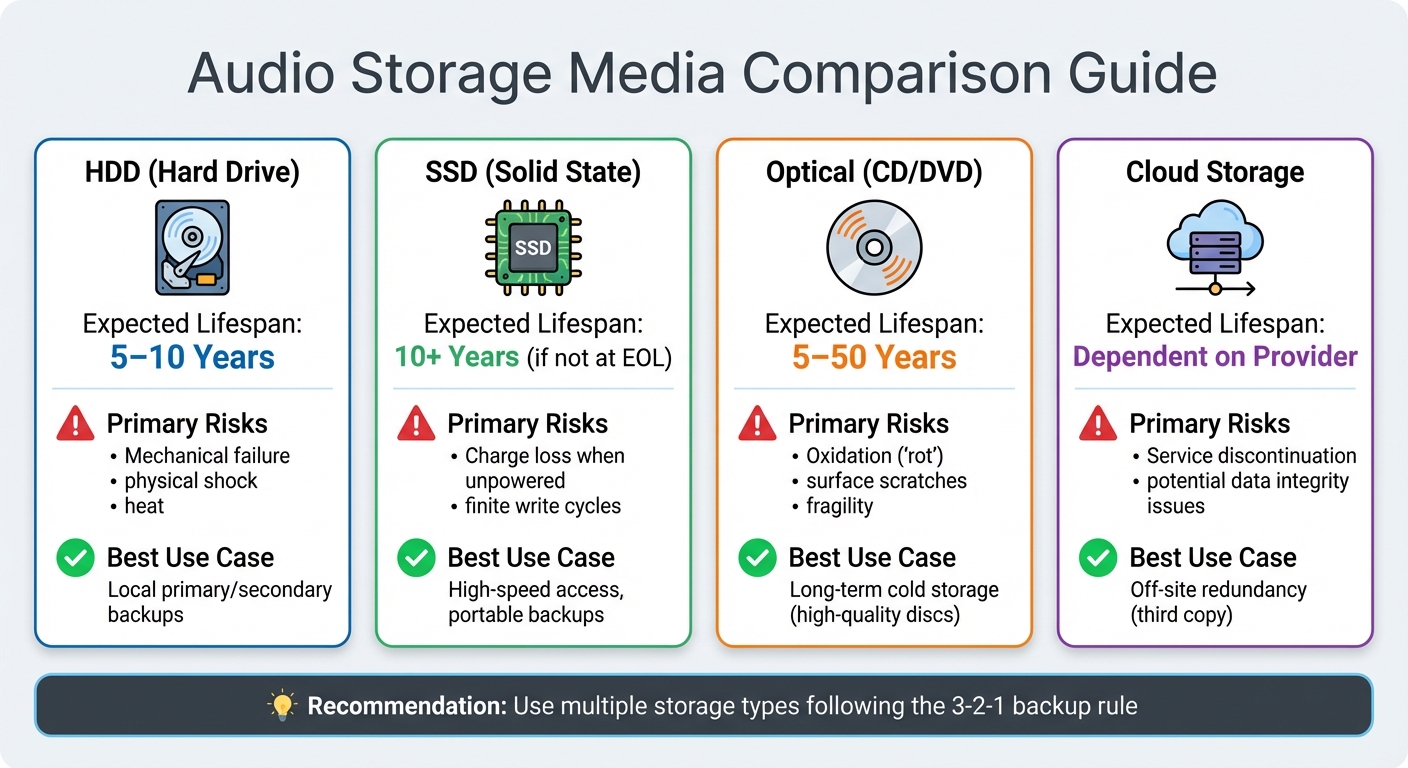
Audio Storage Media Comparison: Lifespan, Risks, and Best Uses
Once you've set up a regular migration plan, the next step is to select backup and storage methods that can withstand the inevitable wear and tear of time. Storage devices degrade eventually, and each type of media has its own vulnerabilities. The trick is figuring out which options suit your needs best and spreading your backups across multiple locations to minimize risks.
Compare Different Storage Media
Every storage medium has its pros and cons. For instance, hard disk drives (HDDs) typically last between 5 and 10 years under stable conditions. However, they’re prone to mechanical failure and physical damage due to their moving parts. On the other hand, solid state drives (SSDs) are more resistant to physical shocks and can retain data for over 10 years when used for archiving. But here's the catch: once an SSD hits "End of Life" (its maximum write cycles), its data retention might plummet to just three months.
Optical discs like CDs and DVDs can last anywhere from 5 to 50 years, but they’re highly vulnerable to oxidation (commonly called "rot"), which can deteriorate the internal layers over time. Plus, with fewer modern computers including optical drives, they’re becoming less practical for everyday use.
Here’s a quick breakdown of storage media:
| Media Type | Expected Lifespan | Primary Risks | Best Use Case |
|---|---|---|---|
| HDD (Hard Drive) | 5–10 Years | Mechanical failure, physical shock, heat | Local primary/secondary backups |
| SSD (Solid State) | 10+ Years (if not at EOL) | Charge loss when unpowered, finite write cycles | High-speed access, portable backups |
| Optical (CD/DVD) | 5–50 Years | Oxidation ("rot"), surface scratches, fragility | Long-term cold storage (high-quality discs) |
| Cloud Storage | Dependent on Provider | Service discontinuation and potential data integrity issues | Off-site redundancy (third copy) |
USB thumb drives are best avoided for long-term archiving. They have limited write cycles and are easy to misplace. To protect your backup drives, disconnect them after transferring data to prevent power surges or malware attacks. It’s also a good idea to store them in anti-static bags, away from direct sunlight, and in a stable environment (around 70°F with 40% humidity). Ultimately, the right media is only part of the equation - diversifying your backup locations is just as important.
Store Backups in Multiple Locations
A solid backup plan isn’t complete without diversifying storage locations. Keeping all your backups in one place leaves you vulnerable to site-specific disasters like fires, floods, or theft. That’s why having at least one off-site backup is essential. This could mean storing a drive at a trusted relative’s home in another state or using cloud storage as an additional layer of protection.
Cloud storage is a convenient secondary backup option, but it shouldn’t be your sole solution. Carefully review service agreements, as many providers include clauses that limit their liability for data loss. For physical drives, external storage typically costs between $50 and $100 per terabyte. After backing up your files, always verify the transfers by checking byte counts through your system properties. These steps help ensure you record family stories for future generations that stay accessible as technology evolves, complementing your earlier efforts in creating life story recordings, format selection, and migration planning.
Add Transcription and Downloadable Formats
Audio files can become obsolete as technology evolves, but transcribing audio and offering multiple file formats ensures your content remains accessible. By converting audio to text and creating backups in various formats, you safeguard your recordings against the limitations of aging playback technology. This approach bridges the gap between older audio formats and modern digital preservation methods.
How Audio-to-Text Conversion Helps
Transcripts turn audio recordings into searchable and reliable archives. Unlike audio formats that may need to be updated over time, text formats like PDF/A and TXT (UTF-8) are ideal for long-term preservation. With transcripts, you can quickly locate specific names, dates, or topics without listening to hours of audio, making research and referencing far more efficient.
"Archiving oral history audio and transcripts means you preserve the content, the meaning, and the rights around it." – Christopher Nguyen, GoTranscript
For best results, maintain both a PDF/A version for preservation and an editable TXT copy for updates. To keep your files organized, link audio recordings to their corresponding transcripts using a unique identifier in the filename - this prevents files from being misplaced or separated. If you plan to publish recordings online, consider creating time-coded transcripts (like WebVTT or SRT) for synchronized playback and improved accessibility.
In February 2026, GoTranscript outlined an archiving workflow that separates preservation masters (e.g., WAV audio and PDF/A transcripts) from access copies (e.g., MP3 and DOCX files). This workflow also includes a README file and a SHA-256 checksum manifest to verify file integrity over time. To maintain accuracy, spot-check transcripts for proper spelling of names and places, ensuring the historical record is preserved accurately. These measures strengthen your preservation strategy, complementing file migration and diverse backup options.
Using Storii for Audio Preservation
Storii takes transcription and preservation a step further by automating these practices. Storii simplifies the process by providing both audio and text formats for your recordings. When you use Storii's automated phone calls to record life stories, the platform transcribes conversations and offers downloads as audiobooks or PDFs. This dual-format system ensures you're not reliant solely on audio playback, as the text version serves as a long-lasting backup.
The downloadable PDF acts as a permanent file you can store locally, while the audiobook format remains compatible with current listening devices. Additionally, Storii makes sharing easy - you can securely distribute files via email, SMS, or links. Since Storii's recording process doesn't require internet access or smartphones, it's especially helpful for capturing stories from older family members who may not be comfortable with modern technology.
Test Your Files Regularly
Keeping audio files safe isn't a one-and-done task. Unlike physical media that you can stash away and forget, digital files demand consistent attention. Lance Stuchell, Director of Digital Preservation Services at the University of Michigan, emphasizes that digital files require active care to remain intact over time.
One of the biggest threats to digital storage is the gradual degradation of storage media, which can eventually lead to data loss. On top of that, files are vulnerable to issues like bit rot, where data deteriorates silently.
To keep your files in good shape, fixity checks are a reliable tool. These checks use algorithms, such as SHA-256, to create a unique digital fingerprint (or checksum) for each file. When you save a recording, generate and store its checksum in a manifest file. Later, you can compare updated checksums with the original to spot any corruption quickly. This process works hand-in-hand with your broader backup and migration plans.
How often should you run these checks? Anywhere from quarterly to annually, depending on your schedule. It's especially important to verify checksums immediately after transferring files to a new server, external drive, or cloud storage - these are moments when data is most at risk. While automated tools can handle much of the heavy lifting, it's wise to manually spot-check some files. Listen to key parts - like the beginning, middle, and end - to catch problems such as audio clipping, playback errors, or missing sections that algorithms might miss.
Beyond fixity checks, make sure your files are still accessible on current devices and platforms. As technology evolves, older file types can become tricky - or even impossible - to open. If you run into compatibility problems, it might be time to convert your files into a more modern and widely supported format.
Regular testing is your safeguard against the ever-changing tech landscape, ensuring your preservation efforts stay effective over the long haul.
Conclusion
Secure the longevity of your audio recordings by starting with the basics. Save your preservation masters as uncompressed WAV or BWF files, create three copies on different types of media, and include detailed metadata. As Christopher Nguyen from GoTranscript explains:
"If you do this work upfront, you reduce risk later, such as lost files, unreadable formats, or accidental release of restricted content".
Once your archive is in place, consistent upkeep is key. Following best practices for digital audio preservation ensures your files stay safe. Perform routine fixity checks using SHA-256 checksums to detect file corruption early, and plan for periodic file migrations as technology advances. Additionally, converting audio into text makes your recordings searchable and provides a reliable text backup, ensuring accessibility even if playback technology changes.
Platforms like Storii make this process easier by automating transcription, organizing metadata, and offering downloadable formats such as audiobooks and PDFs. Whether you're safeguarding family memories or preserving critical interviews, tools like these ensure your recordings remain usable for years to come.
While technology will continue to change, your recordings don't have to be left behind. By choosing durable formats, keeping redundant backups, and conducting regular checks, you're creating a preservation plan that can adapt to future advancements. Start today - future generations will appreciate the effort.
FAQs
WAV or FLAC for archiving?
When it comes to archiving, WAV stands out as the top choice thanks to its uncompressed, lossless quality, which preserves the original recording's fidelity in full. However, FLAC is another excellent option. It offers lossless compression, meaning it reduces file size significantly without compromising audio quality. If your priority is absolute preservation, WAV is the way to go. On the other hand, FLAC provides a more storage-efficient solution for long-term needs.
What’s the easiest 3-2-1 backup setup?
The 3-2-1 backup method is a reliable way to keep your audio recordings secure and accessible. Here's how it works:
- Three copies: Always have three versions of your files.
- Two different media types: Store these copies on two separate types of storage, like an external hard drive and a cloud service.
- One off-site copy: Keep one of those copies in a different physical location to safeguard against local disasters.
This approach provides an extra layer of protection and ensures your recordings are preserved for the long haul.
How do I run SHA-256 checksums?
SHA-256 checksums are a great way to ensure file integrity by generating a unique hash value for a file. Here’s how you can do it using cryptographic tools:
-
Open your command line interface:
- On Windows, use Command Prompt or PowerShell.
- On macOS/Linux, open the Terminal.
-
Run the appropriate command for your operating system:
-
Windows:
CertUtil -hashfile path\to\your\file SHA256 -
macOS/Linux:
shasum -a 256 /path/to/your/file
-
Windows:
- Keep the generated checksum handy. You can compare it later to verify that the file hasn’t been altered or corrupted.
These steps are simple but essential for ensuring the security and integrity of your files.
Related Blog Posts

Storii Gift Box
Best for special occasions such as Mothers Day, Fathers Day, Birthdays and the Holidays.

