

There are questions we always mean to ask. We tell ourselves there’s more time - one more visit, one more call, one more holiday. Then one day, the thought hits hard: what if I never hear that story in their voice again?
I don’t need a studio, fancy gear, or a long plan to start. I just need to begin before “later” turns into regret. This guide shows me how to record my parents’ stories in a simple way, ask better questions, and save what matters before it slips away.
The short version: start now, keep it simple, and save each recording well.
- Pick one part of their life first, not everything
- Use the easiest tool they’ll say yes to
- Ask open questions that lead to stories
- Back up every file right away
Most family history is gone within two generations if no one records it. That fact alone is enough to stop waiting.
I get the best results when I start with one chapter instead of trying to cover a whole life at once. Childhood, first jobs, military years, marriage, parenting, family trips, hard seasons - any one of these is enough for a full session. Small is better. A short talk that happens beats a long plan that never does.
The recording method matters less than people think. What matters is whether my parent feels at ease using it. A phone call works well for long-distance talks. A voice memo works during a visit. A video call helps if I want both face and voice. If apps feel like a hurdle, a simple recorder or a service that calls their phone for them can remove that roadblock.
Before I hit record, I keep the questions open. Instead of asking things that lead to yes-or-no replies, I ask things like:
- What do you remember most about the house you grew up in?
- How did you meet Mom?
- What were holidays like when you were little?
- What did you learn the hard way?
- What do you want your grandkids to know about you?
Those kinds of prompts bring out stories, feelings, and details. And if an answer is short, I don’t rush ahead. I ask, “What happened next?” or “What was that like?” That’s often where the part I’d never hear otherwise begins.
The setup can stay simple, but a few steps help a lot. I try to record in a quiet room, keep the microphone close, test the sound first, and check battery and storage. Then I say the date, place, and names at the start. It takes seconds, but it saves confusion later.
Short sessions work best. 20 to 30 minutes is often enough. People get tired, and memories come more easily when the talk feels easy, not forced. If a story starts to wander, I let it. Some of the best parts show up that way.
After each session, I save the file right away and give it a clear name, such as Dad_childhood_08-27-2026.m4a. Then I keep more than one copy. A good rule is 3-2-1:
- 3 copies total
- 2 different types of storage
- 1 copy stored somewhere else
The Library of Congress says keeping copies on separate media helps lower the risk of loss, and checking them every five years is a smart habit.
Once I have the recordings, I can leave them as audio, turn them into written pages, or group them into a gift for the family. A few trimmed clips, a typed transcript, and some old photos can become something people will come back to - not just now, but years from now.
If I want less work on my side, services like Storii can help by calling my parent on their regular phone, saving the audio, making transcripts, and turning those talks into a book or audiobook. That can help if distance, time, or tech issues keep getting in the way.
What matters most is not doing this perfectly. It’s doing it while I still can.
One recording today is worth more than a plan I never start.
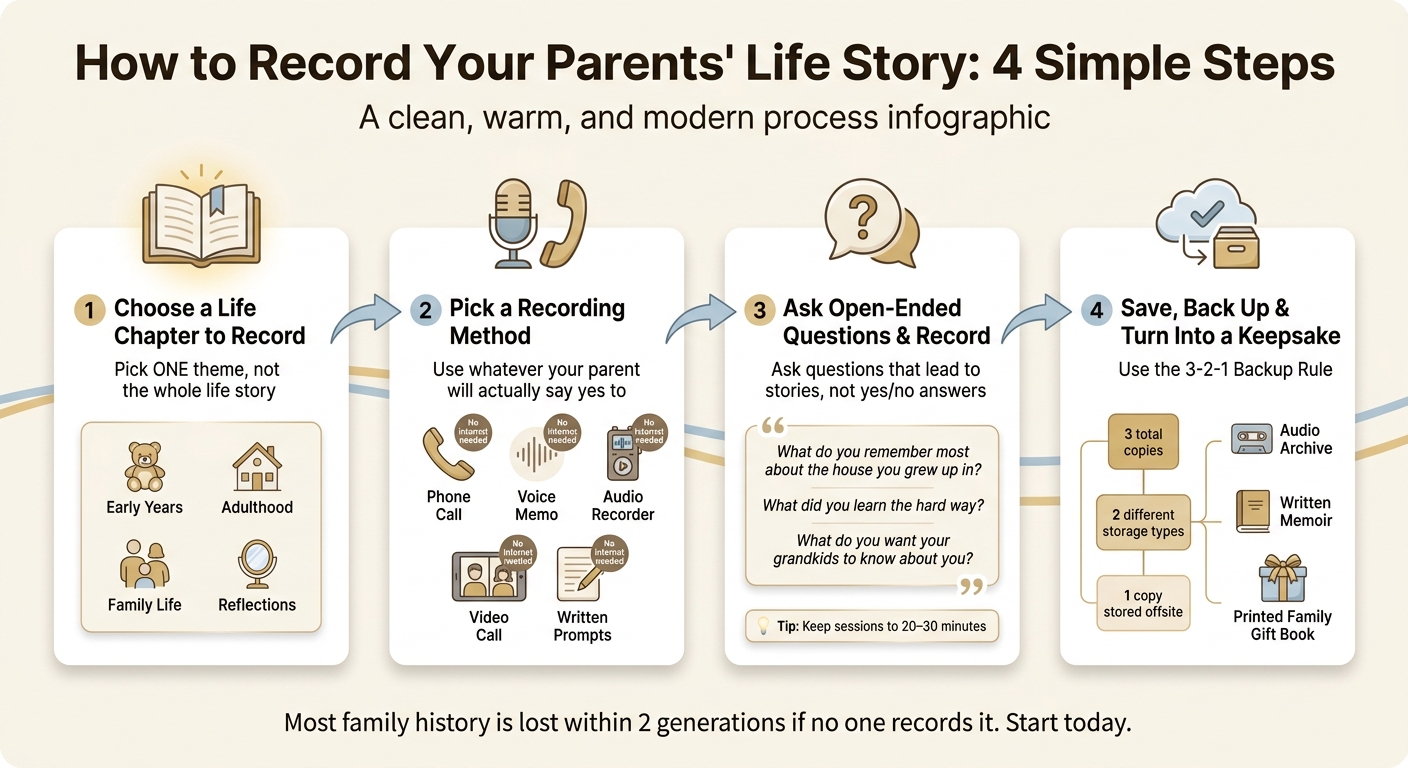
How to Record Your Parents' Life Story: 4 Simple Steps
I Want to Record My Parents Story But Don't Know Where to Start
sbb-itb-ce27d7a
1. Choose What Part of Their Life to Record First
Start with one chapter of their life, not the whole story. That takes the pressure off and helps you hold on to their voice, rhythm, and personality.
Start with one life chapter or theme
The easiest place to begin is usually childhood memories or other simple topics. Questions about where they grew up, a favorite food from childhood, or a hobby they loved are often easy to answer.
From there, you can move into other parts of life - work, military service, how they met your other parent, parenting, or family traditions. Each topic can stand on its own as a separate session.
Group memories by topic to keep conversations natural
Jumping across decades in the middle of one conversation can make things feel scattered, both for you and for your parent. Grouping memories by theme or time period makes the recording easier to follow now and easier to use later when you want to find one specific story.
Here are a few simple session themes:
| Session Theme | Suggested Focus Areas |
|---|---|
| Early Years | Childhood home, school memories, favorite childhood traditions |
| Adulthood | Career journeys, military service, how they met their partner |
| Family Life | Parenting experiences, family holiday traditions, immigration stories |
| Reflections | Life lessons learned from hardship, advice for future generations |
Keep each session short and focused so the conversation feels easy and natural. If it starts to wander, let it. Those side stories are often the ones you end up caring about most.
Once you've chosen the topic, pick the easiest way to record it.
2. Pick a Recording Method That Works for Your Family
Pick the method your parent will actually use. A plain recording that happens is far better than a polished setup that never gets touched.
Simple options: phone calls, voice memos, recorders, video calls, and written prompts
Each option suits a different family setup, and in most cases, you already have what you need.
Phone calls are a good fit for long-distance families, especially if you want the conversation to sound relaxed and familiar. Just make sure your parent knows you're recording and gives permission first. Voice memos are one of the easiest ways to start during in-person visits. Open the app, tap once, and begin. Video calls help when you're in different states or time zones and want to save both the voice and the face behind the story.
A small audio recorder can be a better fit for parents who like physical buttons instead of apps. It also creates audio files that are simple to save and organize later. Written prompts work well for parents who'd rather think before answering. They can write by hand or type their responses, and you can scan them later or shape them into a story.
What to consider before choosing a method
The best choice depends on a few plain factors: your parent's comfort with tech, internet access, distance, and how much setup you're willing to manage. Following life story interview tips can help you prepare for a successful session.
| Method | Internet Needed | Best For |
|---|---|---|
| Phone call | Usually no | Long-distance conversations that feel natural |
| Voice memo | No | In-person sessions |
| Audio recorder | No | Parents who prefer simple tools |
| Video call | Yes | Long-distance families who want audio and video |
| Written prompts | No | Parents who prefer writing or feel shy on audio |
If your parent doesn't have steady internet, phone-based or offline options are often the easiest route. If hearing is an issue, keep the microphone close to the person speaking so the audio comes through more clearly.
If your family wants almost no setup, an automated phone call can take that job off your plate.
How Storii makes recording easier for parents who aren't comfortable with technology
For families where tech feels like a wall, Storii removes most of the hassle. Your parent doesn't need an app or internet access. Storii calls their current landline or cell phone at scheduled times, and they just answer and talk. The call is recorded on its own and saved to the family account.
As Clayton Boeyink, a Storii user, put it:
"I live long distance from my mom and this is a great way to connect with her on a deeper level rather than just FaceTime talking about the weather."
For busy adult children, that kind of built-in routine can help the project keep going without needing a new setup every single week.
Once the method is set, prepare questions that help the story unfold.
3. Prepare Good Questions and Record the Conversation Well
Once you've picked your method, the next step is simple: ask questions that lead to stories, not one-line answers. That’s where the good stuff lives - your parent’s voice, their memories, and the way they see the world. Try to keep the conversation easy and natural, more like a chat at the kitchen table than an interview.
Use open-ended life story questions
Start light. Childhood memories, favorite things, and family traditions are a gentle way in. They help your parent relax before you move into deeper parts of their life. Once they’re settled, you can ask about the moments that shaped them most.
You can use a memory prompt idea finder or start with prompts like these:
- "What is your favorite memory from your childhood home?"
- "How did you and your partner first meet?"
- "What traditions did your family have when you were growing up that you loved?"
- "What was the hardest lesson you ever had to learn?"
- "What are you most proud of in your life?"
- "What is one thing you want your grandchildren to always remember about you?"
If an answer feels a little thin, don’t rush to the next question. Stay with it. Ask, "What was that like for you?" or "What happened next?" Those small follow-ups often bring out the feeling behind the facts.
Set up for a better recording
The room matters more than most people think. A quiet space can make the difference between a recording you’ll want to keep and one that’s hard to use later. Silence notifications, shut the door, and move away from TVs, fans, appliances, and other electronics.
Before you start, make sure your device is fully charged and has enough storage. Then record a short test and play it back. It only takes a minute, and it can save a great story from being lost to bad audio. When you begin for real, say the date, who’s in the room, and the location. It seems small, but it makes files much easier to sort later.
Let the conversation unfold at its own pace
Try not to steer too much when your parent drifts off script. Those side roads often lead to the stories you’d never think to ask for directly. Listen with patience and let the conversation go where it wants to go.
Keep each session to 20–30 minutes. Shorter sessions help avoid fatigue and keep the stories sharp. If the conversation is flowing, that’s a good sign - stop there and set up another session for next time.
After you finish, label the file and save it right away so it’s ready to archive.
4. Turn Your Recordings Into a Lasting Keepsake
When the conversation ends, save the recording right away. An unnamed file sitting on your phone is easy to misplace, especially if the device gets lost, replaced, or damaged. Move the file into your archive system as soon as you're done.
Organize, name, and back up every recording
Start by renaming the file with a clear, searchable format: parent name, topic, and date. For example: Dad_childhood_in_New_York_08-27-2026.m4a. Then place it in one main folder, such as "Mom Life Story 2026."
After that, use the 3-2-1 rule:
- Keep the original on your device
- Sync one copy to a cloud service you already use
- Store a third copy on an external hard drive kept offsite
The Library of Congress recommends making at least two copies on separate media and refreshing those copies every five years to help prevent data loss. A monthly calendar reminder can help make backups part of your normal routine.
Once everything is sorted, the next step is preserving heritage through digital stories that your family will come back to.
Create an audio archive, written memoir, or family gift
Raw audio is just the beginning. If you want people to revisit these stories, it helps to shape them into something easier to browse. One simple way is to group related recordings into themed chapters, like "Dad's Army Years" or "Mom's Life in Texas." Tools like GarageBand (Mac) and Audacity (Windows/Mac) let you trim long pauses and false starts without changing your parent's voice.
If you'd rather make a written memoir, transcribe the audio first. Then organize the text by life stage or topic, with chapter titles such as "Chapter 1: Growing Up in Ohio" or "Chapter 2: Raising a Family." Try to keep your parent's wording as close to the original as you can. That's where the feeling lives.
Add a few photos with captions, export the file as a PDF in standard U.S. letter size (8.5 x 11 inches), and you've got something ready to print. You can order copies through an online book service for a birthday, Mother's Day, or the holidays. It turns a conversation into a gift people will keep.
If you'd rather skip the loose files and build one finished story, there are tools that handle more of the work for you.
Use Storii to preserve and share their story
If managing files, transcripts, and formatting feels like a lot, Storii puts the recordings, transcripts, and memoir in one place. The platform transcribes each recorded conversation on its own, then uses an AI biography rewrite feature to turn the transcript into polished narrative chapters while keeping your parent's voice.
From there, you can download the finished result as an audiobook or a PDF memoir anytime, which also gives you a local backup outside any one platform.
Sharing is straightforward too. You can invite siblings, grandchildren, or other relatives to listen in the app or through a secure link sent by email or SMS. One user said:
"Our family members can see the different life story questions my mom has answered through the app. It's helped us build up sort of a family legacy."
The aim is simple: make the story easy to find, hear, and keep.
FAQs
What if my parent says no to being recorded?
If your parent seems unsure, center the conversation on consent. Be clear about what you'll record, where it will go, and how you'll use it. Let them know they can pause, stop, or skip any question at any time.
It also helps to take the pressure off. Start with easy prompts. Keep each session short. Or use an automated phone-based service, so they can simply answer a call and press a button to record.
How do I handle painful or sensitive memories?
Put your parent’s comfort and sense of control first. Tell them how the recording will be used, who will hear it, and that they can skip any question, pause, or stop at any point.
Begin with lighter memories, then move into more personal topics only if they seem at ease. Pay attention to signs of stress or tiredness, offer a break when needed, and protect their privacy by keeping sensitive recordings limited to the people who should have access.
Which recordings should I save first?
Start with the oldest family members. Their stories are the ones most likely to slip away first.
Put voice recordings at the top of your list. A written note can save facts, but a recording keeps something more human: the sound of their laugh, the pause before a hard memory, the way they tell a story in their own voice.
If you still have voicemails from older relatives, save them now before they disappear. Then move on to other living family members and begin with their childhood memories. That’s often where the best stories live - the small details, the family habits, the moments that shaped everything that came after.
Related Blog Posts

Storii Gift Box
Best for special occasions such as Mothers Day, Fathers Day, Birthdays and the Holidays.

